Before advanced operations
- Microsoft documents Code 52 as a driver that does not meet the signing policy. The official resolution is a signed driver.
- Option 7 (disable driver signature enforcement) is not the first fix, and not a permanent Secure Boot disable.
- Use it only if the driver is required, its origin is known, and official paths failed.
- PowerIX @ Home does not repair Android tablets and does not install Qualcomm drivers.
Context: EDL tablet, Windows 11 PC
This report happened while recovering a Redmi Pad SE (xun) in Qualcomm EDL. The full tablet story is in the Family Link guide. Here only the Windows driver side matters.
The blocking error: Windows cannot verify the digital signature for the drivers required for this device... (Code 52).
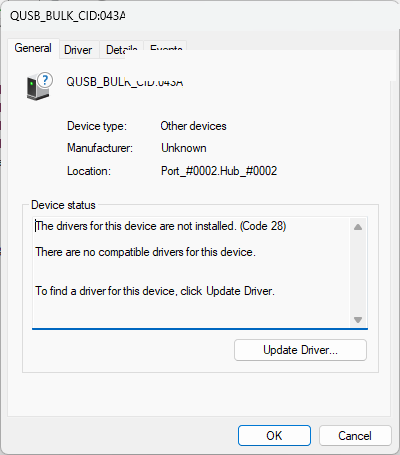
Step 1 — QUSB_BULK and Code 28
The EDL tablet first appeared in Windows as QUSB_BULK, with: The drivers for this device are not installed. (Code 28).
Microsoft documents Code 28 (CM_PROB_FAILED_INSTALL): the drivers for this device are not installed. At that point Windows simply had no driver.
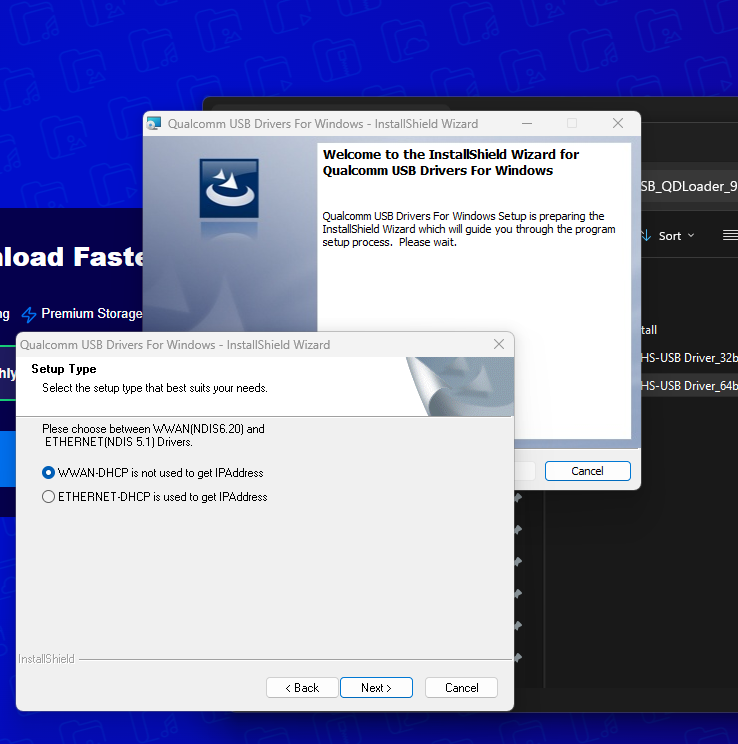
Step 2 — installing the Qualcomm USB driver
I then installed the Qualcomm USB Drivers For Windows package used in this case. This is not a download link, and not a Qualcomm affiliation.
Code 28 went away after that package. The next problem was no longer “no driver”.
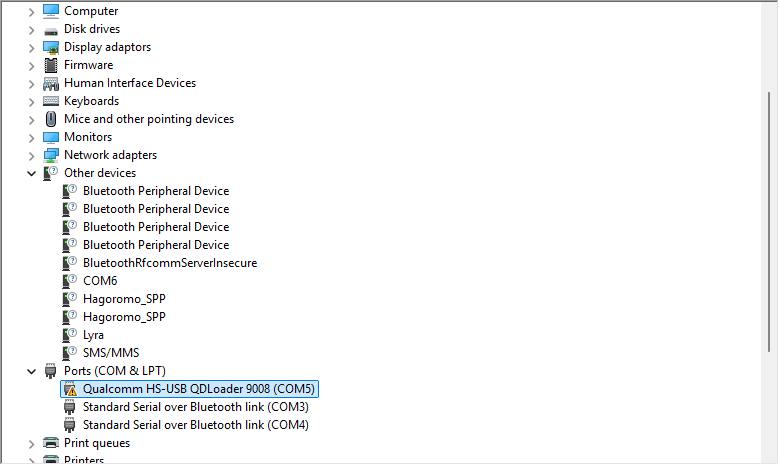
Step 3 — QDLoader 9008
The device became Qualcomm HS-USB QDLoader 9008 (COMx). The COM number does not matter from one PC to another.
Windows now saw the expected EDL device type. Communication was still not guaranteed.
Step 4 — Code 52, signature rejected
Windows then showed Code 52: it could not verify the digital signature of the drivers.
Microsoft calls this CM_PROB_UNSIGNED_DRIVER. Official wording: a file signed incorrectly, damaged, or from an unknown source. The recommended end-user resolution is a signed driver.
Windows has a driver, but will not load it until signature checks pass.
Official paths first
Editorial order, before any startup option: vendor / official driver; Windows Update or a matching build; check signature and publisher; clean reinstall.
Only after that, if the required driver was still rejected and its origin was known, did this report use the temporary no-enforcement mode.
What unblocked this case: option 7
On Windows 11 I restarted through Advanced startup options, then chose option 7 — Disable driver signature enforcement.
In the UI used here, it was option 7. I am not labelling the step “F7”. A key may map to that option, but the choice actually used was number 7.
After booting in that mode, the driver could be used to keep talking to the Qualcomm device.
Microsoft documents loading an unsigned driver as a development / test practice, not a permanent setup. I did not permanently disable Secure Boot, integrity, or signature enforcement.
Temporary session: the driver became usable. This is not advice to leave Windows without signature checks.
Code 28 is not Code 52
Code 28: Windows does not have the required driver. Code 52: Windows has a driver, but rejects its signature or validation.
Treating Code 52 like Code 28 (reinstalling the same package in a loop) changes nothing if the signature is still rejected.
What not to do
Do not present option 7 as the first universal fix.
Do not permanently disable Secure Boot, Device Guard or signature enforcement “so it works”.
Do not install a random Qualcomm driver outside a known package.
Conclusion
In this Windows 11 report the sequence was: QUSB_BULK + Code 28 → Qualcomm driver install → QDLoader 9008 → Code 52 → temporary option 7 → usable driver.
This is a real case, not a Microsoft procedure. The target remains a properly signed driver.

More than 20 years in IT operations, supervision and user support. Creator of PowerIX @ Home. This report documents a real case on his own hardware.
Frequently asked questions
What does Windows Code 52 mean?
Microsoft documents it as CM_PROB_UNSIGNED_DRIVER: Windows cannot verify the driver’s digital signature. The official resolution is to install a signed driver.
What is the difference between Code 28 and Code 52?
Code 28: no driver installed. Code 52: a driver is present but its signature or validation is rejected.
Should I disable driver signature enforcement?
Not first, and not permanently. In this Windows 11 report, option 7 was a temporary session after official paths.
A device problem on your Windows PC?
PowerIX analyses Windows PC health. This guide documents a driver-signature case; it does not mean PowerIX installs Qualcomm drivers.
Diagnose my PC